

How to create a snowfall animation
Last updated on

Christmas is one of the most delightful times of the year, and as you may have noticed, many websites embrace the season with a snowfall effect. I’ve always enjoyed that little touch of magic. While I’ve used various libraries for it in the past, this time I decided to build my own and share the process with you.
Without further ado, let’s get started.
💡 Please note that I’m using Vite as my build tool, so some of the code snippets include Vite-specific syntax for importing styles and workers.
1. Gather your sprites
Before diving into the code, we need to find the right assets. For this animation, all we need is a simple snowball sprite. Luckily, I found a great one on OpenGameArt that works perfectly for our needs.

2. Create the snowfall web component
Let’s create a web component that will render a full screen canvas.
import styles from './styles.scss?inline';
const stylesheet = new CSSStyleSheet();stylesheet.replaceSync(styles);
class Snowfall extends HTMLElement {  private root!: ShadowRoot;  private eventsAbortController: AbortController = new AbortController();
  connectedCallback() {    this.root = this.attachShadow({ mode: 'open' });    this.root.adoptedStyleSheets.push(stylesheet);
    const canvas = document.createElement('canvas');    canvas.width = window.innerWidth;    canvas.height = window.innerHeight;    this.root.appendChild(canvas);
    window.addEventListener(      'resize',      () => {        canvas.width = window.innerWidth;        canvas.height = window.innerHeight;      },      {        signal: this.eventsAbortController.signal,      },    );  }
  disconnectedCallback() {    this.eventsAbortController.abort();  }}
if (!customElements.get('snow-fall')) { customElements.define('snow-fall', Snowfall);}canvas { position: fixed; inset: 0; z-index: 9999; user-select: none; pointer-events: none;}Every time the window is resized, the size of the canvas is also updated to make sure that it’s full screen.
3. Make the rendering seasonal
The snowball effect is usually meant to be seasonal. Once Christmas is over, we often want it to disappear. One way is to remove the component manually, but a cleaner approach is to add some restrictions so the animation automatically pauses when it’s off-season.
import styles from './styles.scss?inline';
const stylesheet = new CSSStyleSheet();stylesheet.replaceSync(styles);
class Snowfall extends HTMLElement {  private root!: ShadowRoot;  private eventsAbortController: AbortController = new AbortController();
  private isInDateRange() {    const [minMonth, minDay] = this.getAttribute('min-date')      ?.split('-')      .map((n) => Number(n.trim())) ?? [1, 1];
    const [maxMonth, maxDay] = this.getAttribute('max-date')      ?.split('-')      .map((n) => Number(n.trim())) ?? [12, 31];
    const now = new Date();    const year = now.getFullYear();
    return [      [        new Date(year - 1, minMonth - 1, minDay),        new Date(year, maxMonth - 1, maxDay),      ],      [        new Date(year, minMonth - 1, minDay),        new Date(year, maxMonth - 1, maxDay),      ],      [        new Date(year, minMonth - 1, minDay),        new Date(year + 1, maxMonth - 1, maxDay),      ],    ].some(([start, end]) => now >= start && now <= end);  }
  connectedCallback() {    if (!this.isInDateRange()) return;
    this.root = this.attachShadow({ mode: 'open' });    this.root.adoptedStyleSheets.push(stylesheet);
    const canvas = document.createElement('canvas');    canvas.width = window.innerWidth;    canvas.height = window.innerHeight;    this.root.appendChild(canvas);
    window.addEventListener(      'resize',      () => {        canvas.width = window.innerWidth;        canvas.height = window.innerHeight;      },      {        signal: this.eventsAbortController.signal,      },    );  }
  disconnectedCallback() {    this.eventsAbortController.abort();  }}
if (!customElements.get('snow-fall')) {  customElements.define('snow-fall', Snowfall);}
4. Create the snowfall renderer
Before diving into the deeper implementation of the snowfall renderer, let’s first create a skeleton.
interface Particle {  scale: number;  x: number;  y: number;  velocity: number;  directionInRadians: number;}
interface State {  canvas: HTMLCanvasElement;  sprite: ImageBitmap;  particles: Particle[];  timeElapsedSinceLastFrame: number;  timeElapsedSinceLastCreation: number;}
export const startRendering = async (  canvas: HTMLCanvasElement,  abortSignal: AbortSignal,  particlesPerSec: number,) => {  const spriteRequest = await fetch('/snowball.png');  const spriteResponse = await spriteRequest.blob();
  const sprite = await createImageBitmap(spriteResponse);
  let lastTimestamp = 0;  const state: State = {    canvas,    sprite,    particles: [],    timeElapsedSinceLastCreation: 0,    timeElapsedSinceLastFrame: 0,  };
  const onFrame = (time: number) => {    if (abortSignal.aborted) return;
    if (lastTimestamp === 0) {      lastTimestamp = time;    }
    const elapsedTime = time - lastTimestamp;    state.timeElapsedSinceLastFrame = elapsedTime;
    lastTimestamp = time;
    // TODO
    requestAnimationFrame(onFrame);  };
  requestAnimationFrame(onFrame);};
What we have now is a renderer which loads the snowball sprite and keeps doing operations on each frame. Let’s also add a call to it in the web component.
import { startRendering } from './renderer';import styles from './styles.scss?inline';
const stylesheet = new CSSStyleSheet();stylesheet.replaceSync(styles);
class Snowfall extends HTMLElement {  private root!: ShadowRoot;  private eventsAbortController: AbortController = new AbortController();  private renderingAbortController: AbortController = new AbortController();
  private isInDateRange() {    const [minMonth, minDay] = this.getAttribute('min-date')      ?.split('-')      .map((n) => Number(n.trim())) ?? [1, 1];
    const [maxMonth, maxDay] = this.getAttribute('max-date')      ?.split('-')      .map((n) => Number(n.trim())) ?? [12, 31];
    const now = new Date();    const year = now.getFullYear();
    return [      [        new Date(year - 1, minMonth - 1, minDay),        new Date(year, maxMonth - 1, maxDay),      ],      [        new Date(year, minMonth - 1, minDay),        new Date(year, maxMonth - 1, maxDay),      ],      [        new Date(year, minMonth - 1, minDay),        new Date(year + 1, maxMonth - 1, maxDay),      ],    ].some(([start, end]) => now >= start && now <= end);  }
  connectedCallback() {    if (!this.isInDateRange()) return;
    this.root = this.attachShadow({ mode: 'open' });    this.root.adoptedStyleSheets.push(stylesheet);
    const canvas = document.createElement('canvas');    canvas.width = window.innerWidth;    canvas.height = window.innerHeight;    this.root.appendChild(canvas);
    window.addEventListener(      'resize',      () => {        canvas.width = window.innerWidth;        canvas.height = window.innerHeight;      },      {        signal: this.eventsAbortController.signal,      },    );
    startRendering(      canvas,      this.renderingAbortController.signal,      Number(this.getAttribute('particles-per-sec') ?? '10'),    );  }
  disconnectedCallback() {    this.eventsAbortController.abort();    this.renderingAbortController.abort();  }}
if (!customElements.get('snow-fall')) {  customElements.define('snow-fall', Snowfall);}
5. Create new snowball particles in each frame
The renderer’s job in each frame is to create new snowball particles, update their positions, and draw them onto the canvas. Let’s start by taking a closer look at the first step: creating the snowball particles.
interface Particle {  scale: number;  x: number;  y: number;  velocity: number;  directionInRadians: number;}
interface State {  canvas: HTMLCanvasElement;  sprite: ImageBitmap;  particles: Particle[];  timeElapsedSinceLastFrame: number;  timeElapsedSinceLastCreation: number;}
const random = (min: number, max: number) => {  return Math.floor(Math.random() * (max - min + 1)) + min;};
const createParticles = (state: State, particlesPerSec: number) => {  const particlesPerMilli = particlesPerSec / 1000;
  state.timeElapsedSinceLastCreation += state.timeElapsedSinceLastFrame;  const totalParticlesToProduce = Math.floor(    particlesPerMilli * state.timeElapsedSinceLastCreation,  );
  state.timeElapsedSinceLastCreation -= Math.floor(    totalParticlesToProduce / particlesPerMilli,  );
  for (let i = 0; i < totalParticlesToProduce; i++) {    state.particles.push({      scale: random(10, 15) / 100,      x: random(0, 100),      y: 0,      velocity: random(10, 20),      directionInRadians: (random(50, 130) * Math.PI) / 180,    });  }};
export const startRendering = async (  canvas: HTMLCanvasElement,  abortSignal: AbortSignal,  particlesPerSec: number,) => {  const spriteRequest = await fetch('/snowball.png');  const spriteResponse = await spriteRequest.blob();
  const sprite = await createImageBitmap(spriteResponse);
  let lastTimestamp = 0;  const state: State = {    canvas,    sprite,    particles: [],    timeElapsedSinceLastCreation: 0,    timeElapsedSinceLastFrame: 0,  };
  const onFrame = (time: number) => {    if (abortSignal.aborted) return;
    if (lastTimestamp === 0) {      lastTimestamp = time;    }
    const elapsedTime = time - lastTimestamp;    state.timeElapsedSinceLastFrame = elapsedTime;
    lastTimestamp = time;
    createParticles(state, particlesPerSec);    // TODO
    requestAnimationFrame(onFrame);  };
  requestAnimationFrame(onFrame);};
Here’s what createParticles does in a nutshell:
First, it calculates how many particles need to be created based on the provided particlesPerSec value.
For example, if particlesPerSec is set to 1000, the renderer should create one particle per millisecond.
Using the time elapsed since the previous frame, the function determines how many new particles should be generated.
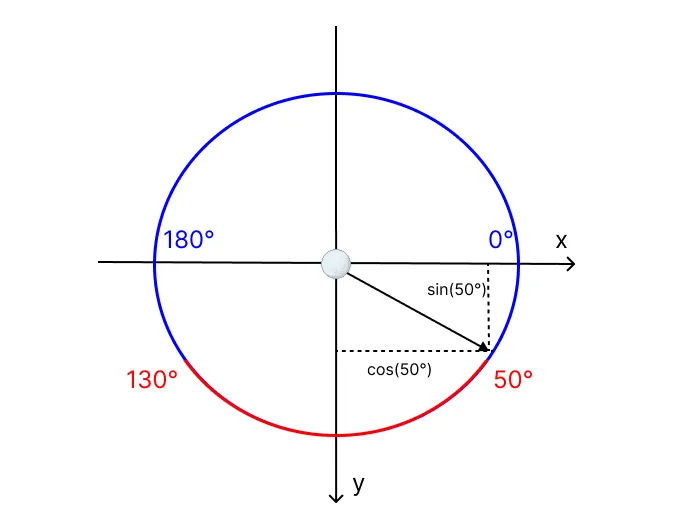
Each particle is then created with randomized properties. This randomness helps the animation feel more natural, since elements in nature are never perfectly uniform. Let’s take a closer look at each property:
scale: Determines the size of the particle (between 10% and 15%).x: The horizontal position of the particle, expressed as a percentage of the canvas width (0–100%).y: The vertical position of the particle, expressed as a percentage of the canvas height (0–100%).velocity: The speed at which the particle falls (10–20%).directionInRadians: The direction in which the particle moves. Each snowball can travel in any direction within a range of 50–130 degrees. This angle is converted to radians so it can be used with sin and cos when calculating movement in 2D space.
6. Update particle positions & draw them
Next, we need to update the positions of the particles in each frame, based on their velocity and direction, and then draw them onto the canvas.
interface Particle {  scale: number;  x: number;  y: number;  velocity: number;  directionInRadians: number;}
interface State {  canvas: HTMLCanvasElement;  sprite: ImageBitmap;  particles: Particle[];  timeElapsedSinceLastFrame: number;  timeElapsedSinceLastCreation: number;}
const MAX_ELAPSED_TIME = 1000;
const random = (min: number, max: number) => {  return Math.floor(Math.random() * (max - min + 1)) + min;};
const createParticles = (state: State, particlesPerSec: number) => {  const particlesPerMilli = particlesPerSec / 1000;
  state.timeElapsedSinceLastCreation += state.timeElapsedSinceLastFrame;  const totalParticlesToProduce = Math.floor(    particlesPerMilli * state.timeElapsedSinceLastCreation,  );
  state.timeElapsedSinceLastCreation -= Math.floor(    totalParticlesToProduce / particlesPerMilli,  );
  for (let i = 0; i < totalParticlesToProduce; i++) {    state.particles.push({      scale: random(10, 15) / 100,      x: random(0, 100),      y: 0,      velocity: random(10, 20),      directionInRadians: (random(50, 130) * Math.PI) / 180,    });  }};
const update = (state: State) => {  for (let i = 0; i < state.particles.length; i++) {    const particle = state.particles[i];    if (particle.y > 100) {      state.particles.splice(i, 1);      continue;    }
    const velocity =      (particle.velocity * state.timeElapsedSinceLastFrame) / 1000;
    particle.y += velocity * Math.sin(particle.directionInRadians);    particle.x += velocity * Math.cos(particle.directionInRadians);  }};
const draw = (state: State) => {  const ctx = state.canvas.getContext('2d')!;
  ctx.clearRect(0, 0, state.canvas.width, state.canvas.height);
  state.particles.forEach((particle) => {    ctx.drawImage(      state.sprite,      (particle.x * state.canvas.width) / 100,      (particle.y * state.canvas.height) / 100,      state.sprite.width * particle.scale,      state.sprite.height * particle.scale,    );  });};
export const startRendering = async (  canvas: HTMLCanvasElement,  abortSignal: AbortSignal,  particlesPerSec: number,) => {  const spriteRequest = await fetch('/snowball.png');  const spriteResponse = await spriteRequest.blob();
  const sprite = await createImageBitmap(spriteResponse);
  let lastTimestamp = 0;  const state: State = {    canvas,    sprite,    particles: [],    timeElapsedSinceLastCreation: 0,    timeElapsedSinceLastFrame: 0,  };
  const onFrame = (time: number) => {    if (abortSignal.aborted) return;
    if (lastTimestamp === 0) {      lastTimestamp = time;    }
    const elapsedTime = Math.min(time - lastTimestamp, MAX_ELAPSED_TIME);    state.timeElapsedSinceLastFrame = elapsedTime;
    lastTimestamp = time;
    update(state);    createParticles(state, particlesPerSec);    draw(state);
    requestAnimationFrame(onFrame);  };
  requestAnimationFrame(onFrame);};
If you notice, I added an upper limit to the elapsed time between frames (MAX_ELAPSED_TIME). This is to prevent large jumps in particle
positions in case the tab is inactive for a while or the browser lags.
7. Different particle generation frequency per screen size
Something I noticed early on was that, while a certain particle generation frequency works well on desktop, it can feel
overwhelming on smaller screens like mobile devices. To address this, we can use different particles-per-sec attributes for landscape
and portrait orientations.
import { startRendering, type RendererConfig } from './renderer';import styles from './styles.scss?inline';
const stylesheet = new CSSStyleSheet();stylesheet.replaceSync(styles);
class Snowfall extends HTMLElement {  static observedAttributes = [    'min-date',    'max-date',    'particles-per-sec-landscape',    'particles-per-sec-portrait',  ];
  private root!: ShadowRoot;  private eventsAbortController: AbortController | null = null;  private renderingAbortController: AbortController | null = null;  private rendererConfig!: RendererConfig;  private orientation =    window.innerWidth >= window.innerHeight ? 'landscape' : 'portrait';
  private isInDateRange() {    const [minMonth, minDay] = this.getAttribute('min-date')      ?.split('-')      .map((n) => Number(n.trim())) ?? [1, 1];
    const [maxMonth, maxDay] = this.getAttribute('max-date')      ?.split('-')      .map((n) => Number(n.trim())) ?? [12, 31];
    const now = new Date();    const year = now.getFullYear();
    return [      [        new Date(year - 1, minMonth - 1, minDay),        new Date(year, maxMonth - 1, maxDay),      ],      [        new Date(year, minMonth - 1, minDay),        new Date(year, maxMonth - 1, maxDay),      ],      [        new Date(year, minMonth - 1, minDay),        new Date(year + 1, maxMonth - 1, maxDay),      ],    ].some(([start, end]) => now >= start && now <= end);  }
  private updateRendererConfig() {    const canvas = this.root.children[0] as HTMLCanvasElement;
    this.rendererConfig = this.rendererConfig ?? {};    this.rendererConfig.canvasWidth = canvas?.width ?? 0;    this.rendererConfig.canvasHeight = canvas?.height ?? 0;    this.rendererConfig.canvas = canvas;    this.rendererConfig.signal = this.renderingAbortController?.signal;    this.rendererConfig.particlesPerSec = Number(      this.getAttribute(`particles-per-sec-${this.orientation}`) ?? '10',    );  }
  private update() {    this.updateRendererConfig();
    if (this.isInDateRange()) {      if (!this.renderingAbortController) {        this.eventsAbortController = new AbortController();        this.renderingAbortController = new AbortController();
        const canvas = document.createElement('canvas');        canvas.width = window.innerWidth;        canvas.height = window.innerHeight;        this.root.appendChild(canvas);
        window.addEventListener(          'resize',          () => {            canvas.width = window.innerWidth;            canvas.height = window.innerHeight;
            this.orientation =              window.innerWidth >= window.innerHeight                ? 'landscape'                : 'portrait';            this.updateRendererConfig();          },          {            signal: this.eventsAbortController.signal,          },        );
        this.updateRendererConfig();        startRendering(this.rendererConfig!);      }    } else if (this.renderingAbortController) {      this.renderingAbortController.abort();      this.renderingAbortController = null;      this.eventsAbortController?.abort();      this.eventsAbortController = null;      this.root.innerHTML = '';    }  }
  connectedCallback() {    this.root = this.attachShadow({ mode: 'open' });    this.root.adoptedStyleSheets.push(stylesheet);
    this.update();  }
  disconnectedCallback() {    this.eventsAbortController?.abort();    this.renderingAbortController?.abort();  }
  attributeChangedCallback() {    if (!this.root) return;
    this.update();  }}
if (!customElements.get('snow-fall')) { customElements.define('snow-fall', Snowfall);}interface Particle { scale: number; x: number; y: number; velocity: number; directionInRadians: number;}
interface State { sprite: ImageBitmap; particles: Particle[]; timeElapsedSinceLastFrame: number; timeElapsedSinceLastCreation: number;}
export interface RendererConfig { canvas: HTMLCanvasElement; canvasWidth: number; canvasHeight: number; signal?: AbortSignal; particlesPerSec: number;}
const MAX_ELAPSED_TIME = 1000;
const random = (min: number, max: number) => { return Math.floor(Math.random() * (max - min + 1)) + min;};
const createParticles = (config: RendererConfig, state: State) => { const particlesPerMilli = config.particlesPerSec / 1000;
state.timeElapsedSinceLastCreation += state.timeElapsedSinceLastFrame; const totalParticlesToProduce = Math.floor( particlesPerMilli * state.timeElapsedSinceLastCreation, );
state.timeElapsedSinceLastCreation -= Math.floor( totalParticlesToProduce / particlesPerMilli, );
for (let i = 0; i < totalParticlesToProduce; i++) { state.particles.push({ scale: random(10, 15) / 100, x: random(0, 100), y: 0, velocity: random(10, 20), directionInRadians: (random(50, 130) * Math.PI) / 180, }); }};
const update = (state: State) => { for (let i = 0; i < state.particles.length; i++) { const particle = state.particles[i]; if (particle.y > 100) { state.particles.splice(i, 1); continue; }
const velocity = (particle.velocity * state.timeElapsedSinceLastFrame) / 1000;
particle.y += velocity * Math.sin(particle.directionInRadians); particle.x += velocity * Math.cos(particle.directionInRadians); }};
const draw = (config: RendererConfig, state: State) => { const ctx = config.canvas.getContext('2d')!;
ctx.clearRect(0, 0, config.canvasWidth, config.canvasHeight);
state.particles.forEach((particle) => { ctx.drawImage( state.sprite, (particle.x * config.canvasWidth) / 100, (particle.y * config.canvasHeight) / 100, state.sprite.width * particle.scale, state.sprite.height * particle.scale, ); });};
export const startRendering = async (config: RendererConfig) => { const spriteRequest = await fetch('/snowball.png'); const spriteResponse = await spriteRequest.blob();
const sprite = await createImageBitmap(spriteResponse);
let lastTimestamp = 0; const state: State = { sprite, particles: [], timeElapsedSinceLastCreation: 0, timeElapsedSinceLastFrame: 0, };
const onFrame = (time: number) => { if (config.signal?.aborted) return;
if (lastTimestamp === 0) { lastTimestamp = time; }
const elapsedTime = Math.min(time - lastTimestamp, MAX_ELAPSED_TIME); state.timeElapsedSinceLastFrame = elapsedTime;
lastTimestamp = time;
update(state); createParticles(config, state); draw(config, state);
requestAnimationFrame(onFrame); };
requestAnimationFrame(onFrame);};8. Offloading to a web worker
To further enhance performance, especially on devices with limited resources, we can offload the rendering logic to a Web Worker. This way, the main thread remains responsive while the snowfall animation runs smoothly in the background. A canvas element may transfer control to an offscreen canvas, which can then be used within a web worker. However, offscreen canvases are not supported in all browsers, so be sure to check compatibility before utilizing this feature.
import { startRendering, type RendererConfig } from './renderer';
const config: any = {};let started = false;
self.onmessage = (event) => {  const data = event.data ?? {};
  for (const key in data) {    if (data[key] !== undefined) {      config[key] = data[key];    }  }
  if (config.canvas) {    config.canvas.width = config.canvasWidth;    config.canvas.height = config.canvasHeight;  }
if (!started) { started = true; startRendering(config as RendererConfig); }};import { startRendering, type RendererConfig } from './renderer';import Worker from './worker?worker';import styles from './styles.scss?inline';
const stylesheet = new CSSStyleSheet();stylesheet.replaceSync(styles);
const BACKGROUND_PROCESSING_SUPPORTED = Boolean(window.OffscreenCanvas);
class Snowfall extends HTMLElement { static observedAttributes = [ 'min-date', 'max-date', 'particles-per-sec-landscape', 'particles-per-sec-portrait', ];
private root!: ShadowRoot; private eventsAbortController: AbortController | null = null; private renderingAbortController: AbortController | null = null; private rendererConfig!: RendererConfig; private worker: Worker | null = null; private orientation = window.innerWidth >= window.innerHeight ? 'landscape' : 'portrait';
private isInDateRange() { const [minMonth, minDay] = this.getAttribute('min-date') ?.split('-') .map((n) => Number(n.trim())) ?? [1, 1];
const [maxMonth, maxDay] = this.getAttribute('max-date') ?.split('-') .map((n) => Number(n.trim())) ?? [12, 31];
const now = new Date(); const year = now.getFullYear();
return [ [ new Date(year - 1, minMonth - 1, minDay), new Date(year, maxMonth - 1, maxDay), ], [ new Date(year, minMonth - 1, minDay), new Date(year, maxMonth - 1, maxDay), ], [ new Date(year, minMonth - 1, minDay), new Date(year + 1, maxMonth - 1, maxDay), ], ].some(([start, end]) => now >= start && now <= end); }
private updateRendererConfig() { const canvas = this.root.children[0] as HTMLCanvasElement;
this.rendererConfig = this.rendererConfig ?? {}; this.rendererConfig.canvasWidth = window.innerWidth; this.rendererConfig.canvasHeight = window.innerHeight; this.rendererConfig.canvas = canvas; this.rendererConfig.signal = this.renderingAbortController?.signal; this.rendererConfig.particlesPerSec = Number( this.getAttribute(`particles-per-sec-${this.orientation}`) ?? '10', );
this.worker?.postMessage({ ...this.rendererConfig, canvas: undefined, signal: undefined, }); }
private update() { this.updateRendererConfig();
if (this.isInDateRange()) { if (!this.renderingAbortController) { this.eventsAbortController = new AbortController(); this.renderingAbortController = new AbortController();
const canvasElement = document.createElement('canvas'); const canvas = BACKGROUND_PROCESSING_SUPPORTED ? canvasElement.transferControlToOffscreen() : canvasElement; canvas.width = window.innerWidth; canvas.height = window.innerHeight; this.root.appendChild(canvasElement);
window.addEventListener( 'resize', () => { canvas.width = window.innerWidth; canvas.height = window.innerHeight;
this.orientation = window.innerWidth >= window.innerHeight ? 'landscape' : 'portrait'; this.updateRendererConfig(); }, { signal: this.eventsAbortController.signal, }, );
this.updateRendererConfig();
if (BACKGROUND_PROCESSING_SUPPORTED) { this.worker = new Worker(); this.worker.postMessage( { ...this.rendererConfig, canvas, signal: undefined, }, [canvas], ); } else { startRendering(this.rendererConfig!); } } } else if (this.renderingAbortController) { if (this.worker) { this.worker.terminate(); this.worker = null; }
this.renderingAbortController.abort(); this.renderingAbortController = null; this.eventsAbortController?.abort(); this.eventsAbortController = null; this.root.innerHTML = ''; } }
connectedCallback() { this.root = this.attachShadow({ mode: 'open' }); this.root.adoptedStyleSheets.push(stylesheet);
this.update(); }
disconnectedCallback() { this.eventsAbortController?.abort(); this.renderingAbortController?.abort(); this.worker?.terminate(); }
attributeChangedCallback() { if (!this.root) return;
this.update(); }}
if (!customElements.get('snow-fall')) { customElements.define('snow-fall', Snowfall);}9. Final thoughts
Finally, we can render the web component in our HTML as follows:
<snow-fall min-date="12-01" max-date="01-06" particles-per-sec-landscape="40" particles-per-sec-portrait="20"></snow-fall>It’s a nice and easy effect and the techniques used here can be applied to other types of particle systems as well. You can experiment with different sprites, colors, and behaviors to create unique effects that suit your website’s or game’s theme.